Thursday, April 8, 2010

Learning from "No School"


This morning I woke to the news there is no school today. Initially, I wished that I had had this information before the students did, so I could have made changes on PantherNet before the students first viewed the subject sites. So, my initial goal was to get on PantherNet and make modification as soon as possible.

In my Environmental Systems and Societies class, I was giving a test on natural capital and demographic analysis. The test was already written, but how was I going to give the test to the students virtually? The objective of assessment is to determine what learning had occurred in the students. I wanted to assess individual student learning, but not allow them to use notes, books, or electronic resources and not allow them to get or give information from or to their classmates. This would be a good time to try out the running of a virtual school and use of an honor code at the same time. I provided the students with this message on the subject PantherNet site:

I hope your preparations and the help sessions have prepared you well for today's test. You will be taking the test away from school today, so you should plan your day accordingly, so the test can be completed and sent back before 2:00. (If you were not prepared for this test today--Expect to [and plan not to have anything conflict with] take it after school Monday [20 April] when we return from break. This is not the regular assessment; this will be a make-up. We will continue with the sustainability unit when we are back.)

When you are prepared with the following, email harveyh@isb.ac.th with the following information and he will send you the test.

When you are ready, send Mr. Hinsz an email with separate statements stating that:

a) you have access to a printer on which you can print a Word document which will be sent to you by email,

b) you will be in an environment in which you will not be disturbed (cell phone off, computer off, TV and other technologies off) by your friends, family, or other duties or expectations.

c) you have access to a camera or cell phone which you can use to email him pictures of your test when you have completed it.

d) you will not access your text, other people, or any resources during the time you are taking the test,

e) you will not discuss or communicate in any form anything about the test with anyone else until after 3:00 this afternoon,

f) you will not share your test or image of it with anyone, and

g) you are ready to receive the test by email, take the test in the hour, and photograph it and email the images to Mr. Hinsz in the 15 more minutes allowed, and abide by these rules.

Tell him you are ready to take the test and would like it to be sent to you. Mr. Hinsz is online and ready to receive your emails.


The statement for a) removed the possibility that students would have a time problem because of printing problems. I should have had the students ensure the printer could print the email I sent them before I sent them the test. One student took 30 minutes beyond the limit, because she could not print and had to copy all the questions by hand onto paper.

The statement for b) was clever, because students were focused and would not be tempted with calls, emails, or text-messages coming from others who might be colluding with them.

The statement for c) allowed me to document that no changes were made to the test after the students said they had finished it. This also allows me to have a digital copy if the student fails to bring me the original. The digital photo is also a time stamp of when the test was finished. If the test took particularly long, one might wonder if the student had used a lot of time searching for answers.

Having students individually write each statement made them cognizant and commit to an honor code. I was not so worried about their sticking to it; the test was not much different than the topics listed on my study guide.

Some things I learned:
School should inform the teachers before the students, so teachers can modify PantherNet before the students are on it. I can see a number of students accessed PantherNet well before I was even informed school was cancelled.

The electricity going out was not planned for. I let students know two scenarios: one with electricity out beyond 11:30 and one if electricity came back on by 11:30. Fortunately the electricity came back at 11:20, so they could take the test.

Some students used scanners, BlackBerrys, and cell phones to photograph their tests and send them in. None of these technologies were taught in my class; students had to get them on their own. Some students took some time to transfer cell phone images to an email account--they might more frequently be sending them to a social networking page.(My "Use of Cell Phones in Class" blog addresses other ways cell phones could effectively be used to promote student learning.)

The students who looked at their emails and looked at the PantherNet sites were often the best students. The worst students did not respond to the email and probably never saw them. They probably saw today as a day free from school expectations. With this experience, will those students learn it is wiser to look at PantherNet when school is closed? Should I have learned to not try to run a class when school is closed?

Some students needed more hand-holding and instruction and repeating of instructions that were already on PantherNet. I was reminded how some students have trouble with the clearest instructions. My having students write me with statements of what they understood was expected of them helped me know they crystalized the instructions before proceeding. It was important that I remained relatively consistently in email contact so students lost little time on task.

Of course, the next step is having the students get and submit the test from and to PantherNet. It's motivating that digital learning always has more ways to improve the way we communicate.

The school will be closed the next day, also. I am having my biology students review the flower diagrams on images.google.com to learn the names of the parts, then find an unlabeled diagram and determine the names of its parts. This will lead into a discussion about their functions when school resumes.

Thanks to Yochin for the Flickr image of the digital contents of a digital learner.

Monday, March 29, 2010

Managing the Digital Classroom

We tried a new program that allowed voice threads and images to record individual ideas about Managing the Digital Classroom better ways to manage technologies in a classroom. I submitted a couple comments and recently tried to make a voice thread, but it didn't work.

The only submission I can find is: "Sometimes there is more than one computer cart in the classroom at one time. To help students remember which cart to return their computer to, place a label of cartoon characters on the cover of the computer that matches the character on the front of the cart."

"Students tend to leave the powercord from their computer hanging out of the cart, onto the floor. Have the students follow a convention of placing the cord over the top of the cart when then take the computer out. This ensures they wil not step on or damage the cord by closing the door on it. It also makes it easy to find the cord for that computer when returning the computer to the cart."

The comment I tried to enter into a voice thread was something like to make the sound clear when you are making a story board or video use a headset that has a microphone attached to it. When I tried to play it back, I could see the progress of my recording, but there was no sound. Dennis suggested it might be the microphone settings on my computer.

Reflections on expanding on use of technologies in the classroom and move toward "flowware"

Some of my blogs lately have followed a pattern of: the plan, the implementation, what I learned. For this blog, I would like to highlight the digital risks I took this semester and list some digital accomplishments.

I got a real scare when the unit plan I had submitted to the Coetail wiki was blank. It helped me sympathize with students who even now are having frustration when we require them to use technologies they don't fully understand.

Being away from all this for a few weeks when I had to return to the US, I was surprised how much skill I lost for doing some basic technological things. I was making and storing voice threads when I left and I lack confidence in that area now.

I focused parts of lab lessons on properly referencing sources of digital information. I was surprised how weak some of my students still were in this area--even this week after I had specifically assigned products related to this.

During the beginning of this semester we discussed the validity of web resources. Students found some food web Internet resources with errors. I wrote the webmaster of one of these (US government) web sites and the site has been corrected and I received a letter from the webmaster of the site. I had asked for volunteers from the clas to do this, but none did). I shared this action and result with the class.

Unfortunately, they did not remove the site from the Internet before it had spread further into the cloud. A quick search just now found another site that uses that same image, is referencing the original source, and has a "topic editor" "reviewing and approving" it.

The students did collaboratively produce a common written product in the values of a resource unit, but I did not get them yet to publish to the world.

With numeracy being a goal for our department and with students having weaknesses in using and analyzing graphic information the units of population dynamics simulations and gathering Internet demographic information and developing a demographic transition model for two countries was ideal for addressing numeracy, student weaknesses, the IB Environmental Systems and Societies syllabus, and global citizenship. (Addressing globalization and numeracy standards were additional goals I mentioned in my Coetail Course 4 project preparation plans.) I am still grading the products, but initial results are encouraging.

Some of my students still lack skills in properly labeling their graphs with titles and axes labels. I offered regular Monday help sessions to address this, but weak students fail to come if they are not required.

Students really responded well to the computer 3-D animation of the parts of a DNA structure. I believe this really assisted the learning of some spatially oriented learners.

Editting on wikipedia was a bold and rewarding move for me. I guess this is the 'next step' in my preparing my students to become global publishers. I was pleased to find wikipedia specifically referencing research I did before I came to ISB and directly linking introductory content to an article I co-authored. I still have not met my goal of writing a new entry for wikipedia.

The unexpected benefit of having students use cell phones, as well as data logging equipment, was a leap in my understanding.

And, of course, the confort with trying out new things on PantherNet to expand student understanding is the most obvious way technologies have impacted student learning in my classes. My SmartBoard presentations are regularly part of my PowerPoint and are assisting students who are frequently absent this semester. Embedding videos and their links are becoming more and more frequent in my PantherNet pages with time.

This semester pushed me to move more toward the flowware that I discussed in a previous blog--seamlessly moving between optimally effective and appropriate technologies to provide students a richer learning environment.

Thank you to Dennis and Jeff for their expertise and patient support throughout this process.

Learn and share on a wiki

I planned a lesson in which I had students learn about renewable, non-renewable, replenishable, and recycleable resources from any resource they wanted, then read examples of each kind of resource on a wikispace, then add two examples of their own that were not close to those already listed on the wikispace. Then each student was to comment on why they suggested that kind of resource belonged to that group.

Some students chose the book we use for the class to find information about the terms, but more chose sites on the Internet, frequently wikipedia. They placed their examples on a wikispaces site, and we will discuss them during the next class.

What I particularly liked about this assignment was that I could watch each entry as they submitted it, and I could determine the validity of each suggestion and get back to the student in class (as I did for two of them). Those students reviewed their submission and changed them.

Next class we will review the characteristics of the four kinds of resouces, then make verbal descriptions of the characteristics of each. They will then review the list they, as a class, put together last class and in their cluster, evaluate the examples and reasons for each category and report changes they would make to the class.

After students completed the assignment:
Only one student did not get the assignment done in the five days since the last class. She didn't attempt the assignment until after 10 pm the night before class and said the Internet would not give her access to the wikispace. When she tried it in class, it opened immediately. After a discussion of the terms, all students were given an assignment of reviewing, correcting, and elaborating on what they had placed on the wikispace.

Playing with production of a group product

I'm toying with an idea of trying to get my Environmental Systems and Societies students to produce something online as a joint project. At first, I thought of setting up a structure of a spreadsheet on Google.doc in which each student has an assigned set of line numbers (like I did on the Resources types project) and each student writes their comments by the number I have placed on a spreadsheet line for them. But this becomes forced when students are trying to do word processing on a spreadsheet document.

Next I thought I'd start a Google.doc Word document with the student numbers, then have the students write their responses next to their number. After completing this, students could read what each other wrote and reflect on it in a space provided at the bottom of the document. This also was forced in the way it wouldn't flow.

My last thought was to divide the students into two groups, give each group a task, (like describing the various kinds of value people place on a given natural capital) a separate Google.doc Word document address, and have each produce a document in which each student writes their part of the final document and all of them are addressing the task to produce a cohesive product.

My most recent thinking is, why set up the Google.doc word processor sheet for them? Show them how to do it and let them produce it all. I abandon this idea because the energies directed toward learning to set up a Google.doc account (yes, they could use their ISB gmail account) would distract from their learning about the various kinds of values given to a resource.

I decided I would follow the path of having students select a resource, divide up the four kinds of values as suggested in our text and each volunteer to write one part of this document. Then I would have them read and append each other's documents. We would wrap up the learning about resources by suggesting which of the resources are more valuable to lesser developed countries (LDCs) or more developed countries (MDCs).

Dennis suggested, rather than having the students compose a Word document together, I have them fill in a table. I liked this idea, because I could put two columns, LDC and MDC, to the left of the table at the end, and students could place an 'X' by the resource that was more important in those kinds of developmental environments.

Thanks to Ronaldo F Cabuhat for the Flickr image of the forest and lake, the two resources the class chose to study further.

The class performed this activity on a day when class was shortened to 55 minutes. There were a few areas which were unexpected learning areas and some that were good for learning.

Some unexpected issues:
a) a student copy-and-pasted material from the Internet and did not give proper references to the source, nor did the student put quotation marks around the information. The student was not learning from the information they had found.
b) I did not find a way to add columns to a word-processer document on Google.doc. I copied the entire table, imported it into Word, added the two initial columns, and exported it back to the original Google.doc document.
c) The content was weak in some areas and the students in the cluster were not good about appending other student's work. There wasn't sufficient time to review all the resources before the end of class, so I had to amend the document so students did not learn the incorrect information presented in this document.
d) students became involved in Internet research that took longer than I had planned for. This delay was, in some instances, due to students not being specific enough in their selection of search terms.

The product that was produced was good for student learning. By coming up with a lot of values of a lake and forest, students created knowledge that helped them produce lists of values for a resource on their exam.

Saturday, March 20, 2010

Reflections on mitosis images

For years the Bio 10 team has used a University of Arizona interactive website to review the phases of mitosis. In addition to specific information about each of the phases, this site is excellent, because it gives the students some small images and has them select the phase each image represents. If the students select incorrectly, a short description helps them understand their mistake.

It is good to review these tested and true sites. The last thing on the worksheet was a video of a cell actually undergoing mitosis. The animation site was dead, so used YouTube search to find a mitosis animation that worked equally well, and give it to the students with the worksheet.

The next thing was to put what they learned together with previous microscope skills they learned last semester. The team decided to have the students do size calculations of the images they saw on prepared slides. Once students had demonstrated this skill at two different powers of magnification, I felt the same task for the other four phases would not improve student learning much, so I modified the lesson to have the students evaluate images from the Internet and label these larger images, which offered more opportunities for detail.

First I had them work with the microscope and find onion root tip slides in anaphase. I chose this phase because students would find many of the other phases and would identify them before they found a much rarer anaphase image. Then:
"Using images from your computer, find plant cells in each of the following phases: INTERPHASE, PROPHASE, METAPHASE, and TELOPHASE. For each phase, look at three different images and choose one that you feel best represents that phase and make a detailed, labeled diagram of it in the appropriate boxes. Include the URL of the site at the bottom of each box."
Flickr image courtesy of The JCB.

Many of the prepared slides were old and their colorizing stains had faded, so the use of Internet slide images was timely. I briefly reviewed with the students how to use Google images and reminded them of the importance of giving references in their presentations.

I had reviewed the images of mitosis on Creative Commons and found only two that were relevant, not enough to create a lesson around. One was the image above. The other was an attractive painting to the left that actually looked like a phase of mitosis.

Flickr image courtesy of rakka.

I verbally told students to check if there were any errors in the images they chose. Looking back on that now, there is little chance they would have seen errors, because the images would more than likely not include labels. A better statement would have been to either check if the phase was correctly labeled or check labeled diagrams (not slide images) of the various phases to see if structures were mis-labeled. An obvious mistake online would have been labeling a centriole on a plant cell. (With the exception of mosses and ferns, plant cells do not have centrioles.)

The use of online images was a good idea. The clarity of detail of the images online allowed students to label their work more thoroughly. The major learning that I didn't expect in this lesson came from how students documented their references. There were four areas I reviewed with students after grading their work:

1) With URLs that are long, students didn't know how to break them up, so they tried to squeeze them into one line. I explained they can move to the next line after any hash mark.
2) Google uses dots, "...." in URLs that are long. Some students copied these: "www.microscopy-uk.org.uk/.../jronionroot.html" and needed to be shown that the URL is in the address line for the browser .
3)Students sometimes gave only the address of the server location, only up to the first hash. We discussed how this is a parent address for all the files in the folders on the server. I explained all valid URLs should end with something like .html, .gif, or .jpg.
4)Students continue to use "http://images.google.co.th/...." as the URL for sites. I explained how Google is a search engine and showed them where the URL is embedded in this address and suggested the image they studied would be better if they actually clicked on the "See full sized image" button.

This lesson brought together a few of the standards we discussed in the course: EL1b, EL1c, EL1d (making diagrams from images and labeling them is considered data processing in Biology and IB Sciences, and EC2b.

I could have expanded this lesson more by having students scan their labeled diagram and display it on a school site for others to view, but I do not believe this would have assisted their learning or the learning of other students. This is a standard I would like to have students do in future activities.

Sunday, March 7, 2010

Computer used to translate for student focus and attention


I haven't tried it yet, but changing the word order in a sentence or presentation can cause a student to return attention to the lesson. Alternatively, it can draw attention to a part of the topic that the presenter wants emphasized.

Do you have some fun want to, hmm? This Yoda language translation site while doing some research on such use of languages I found.

Thanks to niallkennedy for the Flickr image of Yoda.

Friday, March 5, 2010

Online graphing database of competition and predation


Thanks to Wild Dogger for the Creative Commons picture of the impala.
Thanks to ucumari for the Creative Commons picture of the leopard.
Thanks to Olivier DELAERE for the Creative Commons picture of the kongoni.

I still have three more tech-related tasks I want to try with my students to help them learn the concepts of population dynamics: manipulating spreadsheet data to produce population over time graphs, use database data to produce a demographic transition model, and use a wiki or blog to share their views about some issue related to human population changes. ( I also would like to start an entry on wikipedia as an extension effort to this course. )

For this activity I was fortunate to receive a "Population Growth Model" spreadsheet from Laura Brown, an excellent IB presenter for the new IB SL Environmental Systems and Societies course that is offered starting this year. I was able to manipulate the parameters to produce the initial graphs I desire for students related to exponential growth, carrying capacity, competition, and predation on individual sheets of the Excel program.

My goals for this exercise were:
1) to have students gain experience with changing parameters on spreadsheets and seeing the changes in graphs,
2) to have students gain experience with a variety of population concepts by varying parameters to show changes in population curves for different trophic levels,
3) to communicate the tasks clearly so students could go through the exercise without further assistance from others or need any additional assistance from me,
4) to have the students communicate their learning in words by reflecting on their learning, and
5) to have students demonstrate their understanding of the above well on related questions on the unit test.

Later..
I was fortunate in having all students complete the lab over the weekend and complete their reflection on their learning. No students sought help in understanding what to do on the lab and the class did very well on the related questions on the test. A general weakness students had with the lab was understanding why carrying capacities decreased with two species were competing for teh same resources. I covered this concept when I handed the reports back. I should introduce the competitive exclusion principle to students to help them understand this concept better.

The student reflections were specific in parts, like seeing how the herbivore population can affect the predator population, but were occasionally general, like, I gained a better understanding of how populations can affect each other.

This lab addressed Effective Learning standards EL1b, EL1d, EL2a, and EL2c, and Effecive Communicator and Creator standard ECC2.

Wednesday, March 3, 2010

Online 3-D molecular simulation


For this part of my class tech project, I had students use an online site to learn more about DNA. A corresponding worksheet was provided by the Bio 10 team.

Image is the courtesy of the Image Library of Biological Macromolecules based in Jena, Germany, at http://www.ucmp.berkeley.edu/glossary/gloss3/dna.html.

My classes had already studied DNA's structure and almost all students were able to draw a perfect 2-dimensional DNA molecule containing six nucleotides. This activity was intended to give them a deeper understanding of DNA's structure before we moved on to observe replication of DNA. This assignment had an closed part (the worksheet) that requested students to sketch what they saw and an open part (my project) that asked students to comment on their learning. My objective was to evaluate their learning and evaluate the site for future use during the DNA unit.

The site represented a DNA molecule in a three-dimensional projection. Individual chemical radicals (nitrogenous bases, sugar/phosphate backbones, and hydrogen bonds) could be 'amplified' to make them look fatter. Elements were color-coded so they were easily spotted. The molecule could be rotated for viewing from any angle. The molecule could also be set to automatically rotate through 90 degrees. Individual base pairs could be amplified or closer observation. And a click could make all external hydrogen atoms disappear, to make the molecule appear less cumbersome.

After the unit was completed, I asked the students to comment specifically on their learning and to vote if they felt I should use the unit again next year. 62 of 73 students recommended I use this activity again next year for the DNA unit.

Some specific student comments of their learning included:
It showed how the nitrogen bases are perpendicular to the sugars
Helped see where hydrogen bonds are broken for replication (not intended to show this).
From top can see that hydrogen bonds occupy the center
Easier to understand with any angles and highlighting of parts we selected.
Color of elements made it easy to understand
DNA is more complex than what we learned
Twisting together
Color coding
That phosphates contain oxygen
Nitrogen bases next outside ring to hydrogen bonds
The elements of the atoms of DNA
I saw the purine (two rings) and pyrimidine base
If one of the components is missing it might cause a mutation
Hydrogen and nitrogen connect…the side of DNA backbone
Zooming the picture made me see more clearly
The complexity is much greater than I thought
Better understanding what is meant by “double helix”
Different kinds of chemical bonding
Surface is rough, rather than straight
Viewing the DNA strands from the top,…sugar and phosphate appears on the outside
How many hydrogen bonds were formed at each part of DNA
The “Spin” feature ..was very fascinating
How that structure we drew on the quiz actually becomes a helix…a lot more complex
O – N (oxygen and nitrogen) and N – N (nitrogen and nitrogen) form hydrogen bonds
At the outer part of the DNA there is a lot of oxygen and phosphorus
Carbon was the atom [that] DNA contained the most

Students learned considerably more than I had expected. The depth of students understanding helped them with comprehending the replication lessons that followed. The best students were able to get a lot more out of this open-ended lesson:

“I already knew about the exact configuration of the nucleotides, but I did not have an idea how it curved around itself in its double helix shape, specifically how its shape is created with molecules. I noticed how the two nucleotide strands twisting around teach other help to protect the base-pairs in between them. On the molecular level of the base pairs, I noticed how the pairing, A-T C-G, works perfectly with the molecules designed to fit each other.”— T. E. (name withheld)

I will use this lesson in the future.

Thursday, February 18, 2010

From software to flowware

We talk about Web 2.0, a construct of the web accessing itself and people using the power of the Internet to have digital work done for them. I believe a number of our students are already flowing seamlessly between the non-digital word and the digital world and that our next challenge as teachers is to do the same in our instruction. While it is not one of the NETS or ISB standards, having this quick and appropriate accessing of digital information, applications, and conveniences is a goal I am increasingly seeking in my classes. I want to highlight the quick and appropriate.

There are many teachable moments that used to be left to a separate "let's-get-to-that-later-if-time-permits" list off to the right of our white boards. When students ask those questions and the answer is not ever given, the curiousity we seek to tap, the 'digging for deeper understanding' we claim we support, and the contributions shy people give to the class discussion can easily be stifled. With affordable, anywhere, anytime, abundant digital age we live in now, the class can easily donate seconds or a minute to taking advantage of these teachable moments.

Today my lesson was on the history of our understanding of inheritance. I wanted students to learn about racism, prejudism against women in the field of science, and the science behind our present understanding of the structure of DNA. Three times, students asked questions that helped students and me alike know more about this topic. (and I am looking up another question now before I continue....see Chargaff below)

Reference: http://kentsimmons.uwinnipeg.ca/cm1504/Image265.gif

1) A woman named Rosalind Franklin had a "beautiful" x-ray crystalograph of DNA. It looks like a smudged 'X' on paper. "How did she see something about the structure in this picture?" Looking up 'Franklin Crystalography DNA', I found a clear explanation that the 'X' showed there were two helices and the widths of the lines of the 'X' being uniform showed that the two lines were uniform in length.

Reference: http://upload.wikimedia.org/wikibooks/en/5/5d/Biochemcamille2.jpg

2) "Franklin didn't get the nobel prize, but she got an award later..." She not only did not get any award, her real contribution was not recognized until 1968, 15 years after the discovery of DNA's structure and five years after she died of ovarian cancer.


Reference for image on left:
http://media.photobucket.com/image/Watson%20and%20Crick/Primate_bucket/WatsonJames-CrickFrancis.jpg

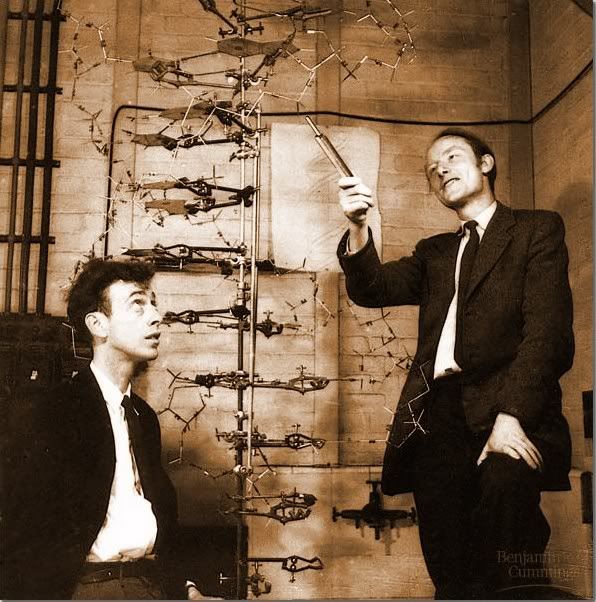
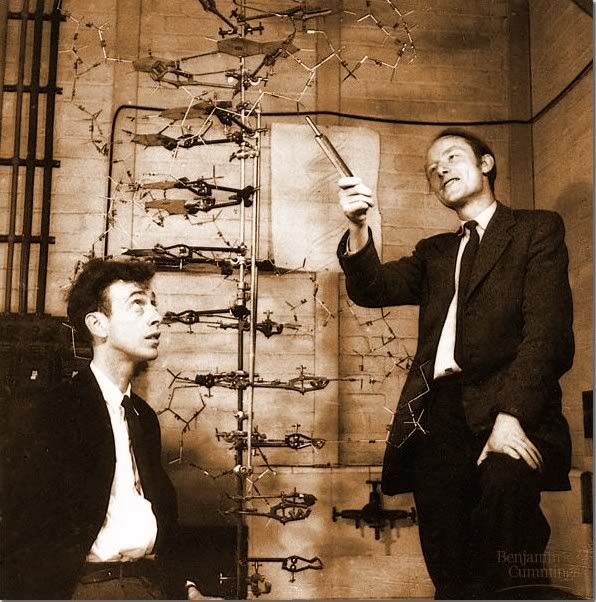
3) I wanted a copy of the posed picture taken of Watson and Crick, which was readily available on google.images . See the above picture on the left.
I also found it on Flickr, thanks to mmullen31. See the image on the right. I am not sure it should be in public domain because it comes from the text Unraveling the History of DNA. Notice the Flickr image does not have the quality of Google.images yet.

4) I remember hearing something about another scientist in the race to discover DNA's structure, Edwin Chargaff. He did not get the Nobel price, either, with Watson and Crick. I knew he had called Watson and Crick something like "intellectual pygmies", so I searched 'Chargaff intellectual pygmies' and got:

He [Chargaff] said later on that, "They impressed me by their extreme ignorance ... I never met two men who knew so little—and aspired to so much." Later on after the structure of DNA had been published Chargaff said, "That in our day such pygmies throw such giant shadows only shows how late in the day it has become." Larry Moran, "Sandwalk: Strolling with a Skeptical Biochemist." 23 July 2007.

In the 50s, the racial and stature slurs were equally insulting.

I guess I did not address the issue of flowware well in this discussion. I do not yet consider myself one who flows seemlessly between technological developments. It is my goal to do so to be a more connected and more appropriate teacher for students of our time.

[The comments added to this site after my posting it shed light onto why the woman Franklin did not get the Nobel prize. She was off base about the helical structure of a complementary A form of DNA. (same source)]

Tuesday, February 16, 2010

Use of cell phones in class

Cell phones come with increasing capacities for doing useful information gathering in science classes. For the present unit, I taught students the skills of planning an investigation in which they measure the change of some populations across some sort of gradient. I gave them a recipe lab to meaure how the density and species of plants changes as one gets further from the trunk of a tree. The students then individually found a gradient on campus that they chose to investigate and developed a lab to sample this.

I thought this would be an ideal opportunity to investigate the variety of ways cell phones could be used in the lab. The plots the students were studying varied from the berm by the parking lot in front of the school, to the weeded area by the Suriwan Gate, to the slopes and drainage ditches on the cross country path around the soccer and baseball fields. I would not be able to be in constant contact with all of the students, so I gave them my cell phone noumber and asked them to call me when they had questions or concerns. I also suggested they use the cell phone to take pictures of the individual species of plants they were sampling and the calculator to do their averaging. I suggested students could use the angle function on some phones to measure the slopes of their plots. Now that I look back on it, those with GPS functions should have included the locations of their plots and used the compass on their phones to lay out the transects of their investigations.

Within five minutes, while I was working with one student, another student 150 metres away had a question that required my going to her plots. I was able to help her move to another, more suitable location early in the class period, reducing frustration and lost class time.

Students also used LoggerPro interfacing during this lab to measure the temperature and light intensities at various locations in their plots. This was done to either ensure these variables were maintained as relatively constant throughout their plots, or showed the values of the independent variable they were studying. (A student might check how the shade of trees affects the plant life. By measuring the light intensities at different locations under a tree and away from a tree, students plot the change in plant species' populations against light intensities.)

To use the light and temperature probes outside, students needed to put batteries in their LoggerPros, open the software on the computer and run the program for the appropriate probes, and use and care for the computers outside. It was a joy to watch students using a computer like they normally would use a clipboard and notebook to gather data and make observations.

Wednesday, December 2, 2009

The ISB TAIL standards - developing a project


On the back channel chat following Kim Cofino’s “Going Global: Culture Shock, Convergence and the Future of Education” (see wiki), the keynote speech for the K12Online09 Pre-Conference, “Seamus” (obviously Jim Fitzgerald) wrote (so I learned) that David Warlick says in his "What Difference Might One 'S' Make" blog, "I would suggest that students simply learn to apply computers to solve problems or accomplish goals….Students would simply learn how computers can help them do interesting things, and then gain the skills and confidence required to teach themselves, with the guidance of their teachers, the applications to make it happen.”

Basically, our assignment of developing a unit that includes the ISB21 Technology and Information Literacy Standards is an application of this having students develop skills and do interesting things learn and demonstrate learning. With the smorgasbord of tools, information, ideas, and means of communicating digitally we were exposed to in this COETAIL course, the challenge of the project is not to develop something that is large enough to encompass a lot of the TAIL standards, it is develop something that will help students gain skills, be interesting, and be the right tool for student learning, rather than a digital add-on.

I find the TAIL standards mimic a lot of the learning reflected in our quality science curricula. Gathering data, evaluating processes and information, planning investigations, conducting research, using digital tools and digital resources, constructing knowledge, and practicing ethical standards are all monthly challenges in the IB science courses. But I feel the Effective Communicator and Creator Standard 1: "Communicating ideas, knowledge, and understanding to audiences ranging from local to global" is one I seldom have my students address. The challenge for me in this project is to see if I can include this in my project.

Along with Tech initiatives, our school and the Environmental Systems and Societies course appear to be developing globalization and environmental awareness standards. Without stating what they are, I would also like this project to include these initiatives.

Reflections about NETS Student and ISB TAIL standards

Looking over the International Society for Technology in Education's (ISTE) National Educational Technology Standards and Performance Indicators for Students (NETS-S) for 2007, especially after comparing them with the American Association of School Librarians (AASL) Standards for the 21st-Century Learner, what is initially apparent to me is how different it is from what was considered 'computer education' in the early 80's. Back then, geek-type students enrolled in the courses to learn about flip-flops, bits and bytes, Boolean functions, making graphics, and learning to program in BASIC (Beginner's All-purpose Symbolic Instruction Code). The curriculum was designed to have students complete set assignments, in class where they had access to computers, under the supervision of a teacher, in preparation for writing programs to do simple operations, like putting numbers in squares. Note all of this was to help the students be prepared.


Thanks to Hanan Cohen for the Flickr image of the old computer.

The NETS standards of the past two decades reflect a different world which is designed for all students (and teachers and administrators). The standards are relevant for every day life operations on a variety of platforms for a variety of functions and for a variety of possible future needs. (These standards are robust in that they are relevant even though the future technological needs cannot yet be defined.) The 'operations' that are to be learned (the curriculum) to meet these standards are dynamic with time and development of new technologies. The assignments to meet these standards are open and go well beyond the use of computers by a few to the infusion of computers into practically everything. The performance that indicates proficiency of these skills is often done not only without supervision of a teacher figure, but also often in collaboration with many peers (and colleagues of many ages and cultures) scattered across the globe. The skills involve a mixing of many technological developments for the demonstration of mastery achievement.

When I consider these and consider the TAIL standards ISB has adopted from these standards, I am drawn to look over the descriptors for Effective Learners (efficiently gather, critically evaluate, effectively use information and plan and conduct research, manage projects, solve problems, and make informed decisions using tools and resources, is see a description of the path students take through our HS Science laboratory investigations program. I am proud of what we do, but this breakdown helps me realize how much learning students get.

The HS Science program gives students a variety of lab investigations to do to prepare them in each aspect of the Effective Learners’ profile. In biology, we meet regularly to work investigations into our units. The IB program has a requirement of students independently and collaboratively plan, investigate, manage, analyze, and communicate about their research. The use of technologies for data logging, statistically and mathematically analyzing, graphing, and investigating is embedded in both these programs. Individual planning of investigations and evaluating the weaknesses and improvements of investigations is a focus in my biology classes presently.

1)This is good to think about what more areas of learning to consider for my students

2)I could assign students to do on line reading for ESS more, then report on their reading to the class. They could do this for their home country.

3)I could recommend use of Creative Commons more

4)I don’t do much in which students produce group results. This is an area to consider.

Wednesday, November 4, 2009

Who's responsible?......Who, me?


Answering the question ‘Whose job is it to give students technology training in a school?’, one needs to look at who does it?, who supervises it, who evaluates it, who gets given time to do it, and who gets paid to do it? I prefer to consider what is the best way to make it happen in a school.

First, the school community needs to investigate what all ‘technology training’ involves and decide to what extent it will commit energy, funds, time, and support to the students, staff, administration, and parent community getting on board. A vision, mission, and/or philosophy is then agreed upon by the stakeholders and a strategic plan is developed to get the resources to make the plan a reality.

This paragraph may seem boring or needless, but it is most essential in answering “What is the best way to make it happen?” A philosophy of parent involvement and education for parents is far from a strategy of having scheduled computer labs that all students attend on a rotating schedule. Hiring staff that are technoliterates and assigning them to train a cluster of the staff is different than bringing in presenters and requiring all staff attend PD days. And checking off each student’s computer skill ability levels is different than having students individually self monitor their technological understandings and skills and developing individual growth plans.

In a school whose focus is learning, the question might be re-phrased, “Who is responsible for the technological skills development?” I think the answer to this question needs little discussion--Everyone in the community is responsible to learn technology and support the goal of increasing the community’s technological literacy.

We all benefit from the entire community being able to effectively use PowerSchool, communicate by email, honor copyright agreements and proper referencing codes, access PantherNet information, effectively search the Web, supporting broad-band reliable access, and providing carts with computers readily accessible for student learning. Being in a department of technophiles makes my instructional environment richer and, I believe, also improves student learning.

A piece of the “Everyone” that I seldom hear this responsibility assigned to is the student. In a school priding itself in students being aware of their own learning, I advocate that students know their own strengths and weaknesses and individually develop learning plans and challenges to improve their skills. Some may find themselves learning digital photography, make podcasts, blog about a passion they have, mix music, use new data-logging probes, expand their use of other platforms, or try different avenues and levels in the communication of ideas with other students and their teachers.

Staff and the community could have similar goals to continually raise technoliteracy. In time, the community would be considered tech savvy much the same as communities are considered outdoorsy and physically fit.

Flickr image by Roo Reynolds

Which of the TAIL standards do I address?

After we studied the TAIL standards, I wondered which of them I addressed and which of them I hadn't. I discussed it with Dennis and chose to address these standards in two parts. One was to matched the TAIL standards of the activities I now do in my classes. The other was to reflect on what I learned from reviewing the standards.

I found the areas I address least were in the standards for Effective Learners. Of these, I found no activity in which I presently address standards:
EL1a inquire about their learning…,
EL1c selecting information [tech] tools based on the task,
EL2a analyze to make informed decisions, and
EL2b use multiple processes and diverse prospectives.

For the other standards, I summarized that address them the following number of times:
ECC1a - 2
ECC1b - 2
ECC2a - 3
ECC2b - 4
EC1a - 4
EC1b - 1
EC1c - 4
EC2a -5+
EC2b - 1
EC2c - 1

I investigated the spirit of the IB program more thoroughly to understand how their standards might overlap these and the goals of ISB (as addressed in a previous blog). For the use of information and communication technology (taken from the 2010 version of the Environmental Systems and Societies Guide) "teachers should attempt to expose students to a variety of ICT media, resources, software and hardware,...... calculators as data collection devices (data loggers).....electronic data measuring and recording equipment...hand-held global positioning systems. Students should...utilize the wealth of data, information, and software avialalbe on teh World Wide Web. It is important .... that students are encouraged to develop the skills necessary to evaluate this data and information critically." (page 13. As I move forward to develop my project, I would like to keep this in mind.

Sunday, November 1, 2009

Course reflection: Another beginning...


My confidence in the production, finding, and use of video images leeped repeatedly during this course. I hoped I would learn to find good video images and maybe make a video out of slides, but now I am comfortable planning a video storyboard, getting images and video to support it, splicing and splitting, transitioning and labeling, and adding sound and my voice over the images to make a story. Yesterday I thought of sending my mother a four-minute video of us and our activities here. It took me 50 minutes from sitting to the computer until I published it on YouTube.

[A skill I developed that I didn't think about at all was editting the html of these sites to make them 'work'.]

I have made a content video about a challenging topic, productivity. I published it to YouTube and it has been viewed 80 times since then. Someone embedded it in www.encyclopedia.com and (besides my embedding it in PantherNet) it has been embedded in two other sites.

I found the discussion about preparation for keeping school functioning online if we had to close temporarily most relevant. I have challenged myself to learn all I need to to use PanthNet for my classes now and try using technologies in preparation for a school closure. I find PantherNet to be an asset for all students, especially the lesser organized students. Students seem to become increasingly dependent on this avenue of learning and are beginning to use computer malfunctions and lack of Internet access as an excuse for not preparing for class, even when it is a couple hours before due times. On one hand, we are preparing students for their future integrations with technologies. On the other hand, I fear students are leaving more to do later when they know everything is always available to them online.

I think the best demonstration of my learning is the three 4-minute story boards with video, dialogue, still images, and transitions that I made for my mother to see on YouTube. Every time I do a new one, the continuity gets better, the time to complete it gets less, I gain confidence, and I feel happier.

I'm trying to line up three images on one line below, but have not been successful.


Panther Creative Commons Flickr image from tim ellis
Pampers Creative Commons Flickr image from majorbonnet
butterfly Creative Commons Flickr image from e³°°°
bee Creative Commons Flickr image from aussiegall
bugs Creative Commons Flickr image from by Marten LaBar

Friday, October 30, 2009

What if . . . . a school had to close temporarily....?

If a school this size had to close for a week or two, what would need to be taken into consideration? I've given it some thought since this Coetail Course 3 started and during the coming days will detail some of the thoughts and concerns I've pondered during this course. I will start writing this as a series of questions I have been considering. I hope to respond to some of these questions if time permits.

What would need to be taken into consideration to optimize student learning?
If students learn in groups, how can stuff be shared by groups?
How would Face-to-Face (F2F) meetings occur?
How would group fora be conducted?
Blended classrooms – is this a skill all students should experience anyway?

Would the closure be complete or partial? Could the school be closed by division? Would the administration allow teachers to conduct courses from off-site, the Americas, Hua Hin, home, or a vacation spot and can instruction be effective from those locations?

How would teachers (and students) best communicate with each other?

Should teachers give students regualar, clearly-scheduled times when they will be available?

What would teacher of student (and supervisor of teacher) assessment look like?

Which applications would be most relevant for which courses (and communications)?
Podcast, embedded video, PantherNet chat, Wikispaces, Movie Maker, all the present applications on the PantherNet minimum list.

Would there be reliable service and access for all stakeholders?

Should teachers now be selecting units they lend themselves best to blended classroom instruction and shoule teachers be preparing for this instruction now?

Should we get the entire ISB community (students, teachers, admin, Ed Tech, Board, and parents) to buy into this concept now, so we are prepared when the day arrives? and Should we be trial running some aspects of this kind of education now?

If some teachers are not prepared to run such a class, would it jeopardize the tech savvy teachers from being able to continue with their classes?

What is the best use of time with both individual student issues and groups of students?

How can teachers protect themselves from being constantly "on call"? Would an eight-hour work day be respected by the community? Could teachers set schedules for the time they will maintain contact? Could students work on schedules from the other side of the globe?

Would it take so much time to prepare an online lesson, or gather and comment on students' submitted work, or dealing with individual commmunications that such a course would not be feasible? Would the demands on student time increase significantly?

What would be an effective activity for students to blog to the rest of the group? The assignment I gave today: Having students read three Research Questions we developed in class, individually write the dependent and independent variables, and as a group write the key and lesser controlled variables and how they would be measured and controlled, might work as an activity. Students certainly could learn from each other. But would the weaker students find this a way to lay low? And how could the teacher help these weaker students become activated to contribute *more* than they usually do? I normally would use classtime for them to share. Maybe some students would be rejuvenated to learn in this new environment.

All students are going to have to get over the concept of being right or wrong – all of us are learning. Maybe I need to break students in a bit with this learning online.

A storyboard with emotion, story, and cause

This clip is a series of short snapshots by the Greek Ministry of Culture and Hellenic Culture Organization annimations with gradual transitions shows the history of the Parthenon. The angles of view, color, music, and occasional dramatic demonstrations of destruction lull one into feeling for the "owners" of the Parthenon throughout its history. It draws one to feel for the "owners" as victims of the powerful countries who stole their cultural heritage through the years.

I like how the storyboard portrays various political and religious forces' impacts upon the Parthenon. The director, Costa Gavras, created some controversy by portraying these participants in sometimes unfavorable lights.

Monday, October 12, 2009

Putting it all together in a video

After class I decided to find a way to solidify my learning by putting it all together: sound, splitting, recording, muting, publishing, embedding into my blog, and titles on slides and over video, by making a digital gift for my daughter for her efforts in this season’s basketball. After learning the newer cameras take mp4 video, I got out an old camera with which I had taken some digital clips of her games.

I had trouble getting the product on YouTube because there is apparently an issue with downloading from Internet Explorer. I learned Movie Maker made my regular computer freeze up a lot. It eventually died in the class and I had to get another one for the weekend. I learned if I tried to do anything to the story line before I clicked “Done” for the last operation, Movie Maker and the new computer froze up. (This happened three times, before I figured it out.) Using the new computer I had to learn some basics of Word 2007, which is not on my old computer. But most of all I learned how to place the lines of a label over a video that still allowed the observer to see the video action where I wanted their attention drawn.

The next thing I had to learn was to make a YouTube account. It was good having a Gmail account, which made it easy. By publishing this video on YouTube, I can offer my mother an opportunity to see her granddaughter playing basketball. I would next like to try recording a lesson using the SmartBoard recorder then placing sound over it.

A relevant lesson using video in science

Today’s short session on Movie Maker showed me how to import music, split a sound track, embed a message on an image or on a title sheet, how to “twiddle” the audio track, and some transitions. Other rules for using Movie Maker include: start by making a folder for the project, save often, that .mov and .mp4 are kind of Apple video formats while .avi and .wmv are PC video formats and are probably only compatible on their platform, it crashes a lot when a lot of memory (more than three minutes) is being used. iMove is easier to use, can handle bigger files, and can handle mp4.

After today’s discussions about effective use of video we were given an assignment to make a short presentation. Patience, Karen, and I thought it would be informative and fun to have a video showing students how to properly (and improperly) use a microscope. We selected three of the most important concepts, developed good and bad behaviors for those concepts, and planned our storyboard. Our plan included both still images (which our Flip video camera had to take as video) and action shots. We got all the pictures and recorded on shattering glass sound, then tried to import them into iMovie. This didn’t work so we simultaneously imported the clips into iPhoto on an Apple and tried to import the clips into Windows Movie Maker on a new PC. We struggled with this for 20 minutes and returned to class. Later, Patience finished the video:


In class we learned we had problems because the Flip camera takes images in mp4. Both our programs could not handle this. We still learned a lot about how we could effectively use video for teaching a lesson, especially if it is funny.

On a related note, You Tube is continually increasing its abundance of excellent video footage that is relevant in a science class. The link below is one I find noteworthy for the concepts of food chains, decomposition, productivity, and upwelling:


Antique microscope images originally posted on Flickr by Jacopo Werther then posted on Wikimedia by Mike Towber.