Friday, March 5, 2010

Online graphing database of competition and predation


Thanks to Wild Dogger for the Creative Commons picture of the impala.
Thanks to ucumari for the Creative Commons picture of the leopard.
Thanks to Olivier DELAERE for the Creative Commons picture of the kongoni.

I still have three more tech-related tasks I want to try with my students to help them learn the concepts of population dynamics: manipulating spreadsheet data to produce population over time graphs, use database data to produce a demographic transition model, and use a wiki or blog to share their views about some issue related to human population changes. ( I also would like to start an entry on wikipedia as an extension effort to this course. )

For this activity I was fortunate to receive a "Population Growth Model" spreadsheet from Laura Brown, an excellent IB presenter for the new IB SL Environmental Systems and Societies course that is offered starting this year. I was able to manipulate the parameters to produce the initial graphs I desire for students related to exponential growth, carrying capacity, competition, and predation on individual sheets of the Excel program.

My goals for this exercise were:
1) to have students gain experience with changing parameters on spreadsheets and seeing the changes in graphs,
2) to have students gain experience with a variety of population concepts by varying parameters to show changes in population curves for different trophic levels,
3) to communicate the tasks clearly so students could go through the exercise without further assistance from others or need any additional assistance from me,
4) to have the students communicate their learning in words by reflecting on their learning, and
5) to have students demonstrate their understanding of the above well on related questions on the unit test.

Later..
I was fortunate in having all students complete the lab over the weekend and complete their reflection on their learning. No students sought help in understanding what to do on the lab and the class did very well on the related questions on the test. A general weakness students had with the lab was understanding why carrying capacities decreased with two species were competing for teh same resources. I covered this concept when I handed the reports back. I should introduce the competitive exclusion principle to students to help them understand this concept better.

The student reflections were specific in parts, like seeing how the herbivore population can affect the predator population, but were occasionally general, like, I gained a better understanding of how populations can affect each other.

This lab addressed Effective Learning standards EL1b, EL1d, EL2a, and EL2c, and Effecive Communicator and Creator standard ECC2.

Wednesday, March 3, 2010

Online 3-D molecular simulation


For this part of my class tech project, I had students use an online site to learn more about DNA. A corresponding worksheet was provided by the Bio 10 team.

Image is the courtesy of the Image Library of Biological Macromolecules based in Jena, Germany, at http://www.ucmp.berkeley.edu/glossary/gloss3/dna.html.

My classes had already studied DNA's structure and almost all students were able to draw a perfect 2-dimensional DNA molecule containing six nucleotides. This activity was intended to give them a deeper understanding of DNA's structure before we moved on to observe replication of DNA. This assignment had an closed part (the worksheet) that requested students to sketch what they saw and an open part (my project) that asked students to comment on their learning. My objective was to evaluate their learning and evaluate the site for future use during the DNA unit.

The site represented a DNA molecule in a three-dimensional projection. Individual chemical radicals (nitrogenous bases, sugar/phosphate backbones, and hydrogen bonds) could be 'amplified' to make them look fatter. Elements were color-coded so they were easily spotted. The molecule could be rotated for viewing from any angle. The molecule could also be set to automatically rotate through 90 degrees. Individual base pairs could be amplified or closer observation. And a click could make all external hydrogen atoms disappear, to make the molecule appear less cumbersome.

After the unit was completed, I asked the students to comment specifically on their learning and to vote if they felt I should use the unit again next year. 62 of 73 students recommended I use this activity again next year for the DNA unit.

Some specific student comments of their learning included:
It showed how the nitrogen bases are perpendicular to the sugars
Helped see where hydrogen bonds are broken for replication (not intended to show this).
From top can see that hydrogen bonds occupy the center
Easier to understand with any angles and highlighting of parts we selected.
Color of elements made it easy to understand
DNA is more complex than what we learned
Twisting together
Color coding
That phosphates contain oxygen
Nitrogen bases next outside ring to hydrogen bonds
The elements of the atoms of DNA
I saw the purine (two rings) and pyrimidine base
If one of the components is missing it might cause a mutation
Hydrogen and nitrogen connect…the side of DNA backbone
Zooming the picture made me see more clearly
The complexity is much greater than I thought
Better understanding what is meant by “double helix”
Different kinds of chemical bonding
Surface is rough, rather than straight
Viewing the DNA strands from the top,…sugar and phosphate appears on the outside
How many hydrogen bonds were formed at each part of DNA
The “Spin” feature ..was very fascinating
How that structure we drew on the quiz actually becomes a helix…a lot more complex
O – N (oxygen and nitrogen) and N – N (nitrogen and nitrogen) form hydrogen bonds
At the outer part of the DNA there is a lot of oxygen and phosphorus
Carbon was the atom [that] DNA contained the most

Students learned considerably more than I had expected. The depth of students understanding helped them with comprehending the replication lessons that followed. The best students were able to get a lot more out of this open-ended lesson:

“I already knew about the exact configuration of the nucleotides, but I did not have an idea how it curved around itself in its double helix shape, specifically how its shape is created with molecules. I noticed how the two nucleotide strands twisting around teach other help to protect the base-pairs in between them. On the molecular level of the base pairs, I noticed how the pairing, A-T C-G, works perfectly with the molecules designed to fit each other.”— T. E. (name withheld)

I will use this lesson in the future.

Thursday, February 18, 2010

From software to flowware

We talk about Web 2.0, a construct of the web accessing itself and people using the power of the Internet to have digital work done for them. I believe a number of our students are already flowing seamlessly between the non-digital word and the digital world and that our next challenge as teachers is to do the same in our instruction. While it is not one of the NETS or ISB standards, having this quick and appropriate accessing of digital information, applications, and conveniences is a goal I am increasingly seeking in my classes. I want to highlight the quick and appropriate.

There are many teachable moments that used to be left to a separate "let's-get-to-that-later-if-time-permits" list off to the right of our white boards. When students ask those questions and the answer is not ever given, the curiousity we seek to tap, the 'digging for deeper understanding' we claim we support, and the contributions shy people give to the class discussion can easily be stifled. With affordable, anywhere, anytime, abundant digital age we live in now, the class can easily donate seconds or a minute to taking advantage of these teachable moments.

Today my lesson was on the history of our understanding of inheritance. I wanted students to learn about racism, prejudism against women in the field of science, and the science behind our present understanding of the structure of DNA. Three times, students asked questions that helped students and me alike know more about this topic. (and I am looking up another question now before I continue....see Chargaff below)

Reference: http://kentsimmons.uwinnipeg.ca/cm1504/Image265.gif

1) A woman named Rosalind Franklin had a "beautiful" x-ray crystalograph of DNA. It looks like a smudged 'X' on paper. "How did she see something about the structure in this picture?" Looking up 'Franklin Crystalography DNA', I found a clear explanation that the 'X' showed there were two helices and the widths of the lines of the 'X' being uniform showed that the two lines were uniform in length.

Reference: http://upload.wikimedia.org/wikibooks/en/5/5d/Biochemcamille2.jpg

2) "Franklin didn't get the nobel prize, but she got an award later..." She not only did not get any award, her real contribution was not recognized until 1968, 15 years after the discovery of DNA's structure and five years after she died of ovarian cancer.


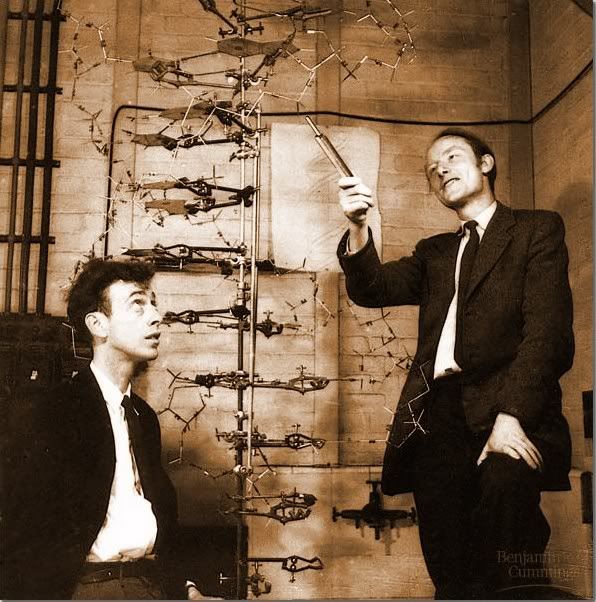
Reference for image on left:
http://media.photobucket.com/image/Watson%20and%20Crick/Primate_bucket/WatsonJames-CrickFrancis.jpg

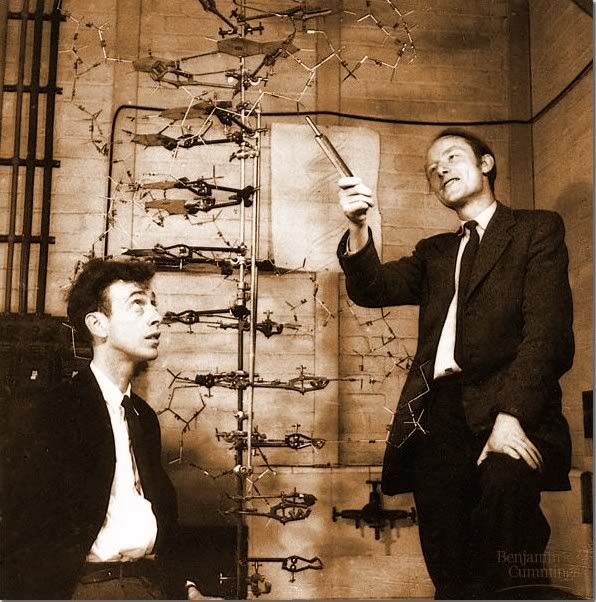
3) I wanted a copy of the posed picture taken of Watson and Crick, which was readily available on google.images . See the above picture on the left.
I also found it on Flickr, thanks to mmullen31. See the image on the right. I am not sure it should be in public domain because it comes from the text Unraveling the History of DNA. Notice the Flickr image does not have the quality of Google.images yet.

4) I remember hearing something about another scientist in the race to discover DNA's structure, Edwin Chargaff. He did not get the Nobel price, either, with Watson and Crick. I knew he had called Watson and Crick something like "intellectual pygmies", so I searched 'Chargaff intellectual pygmies' and got:

He [Chargaff] said later on that, "They impressed me by their extreme ignorance ... I never met two men who knew so little—and aspired to so much." Later on after the structure of DNA had been published Chargaff said, "That in our day such pygmies throw such giant shadows only shows how late in the day it has become." Larry Moran, "Sandwalk: Strolling with a Skeptical Biochemist." 23 July 2007.

In the 50s, the racial and stature slurs were equally insulting.

I guess I did not address the issue of flowware well in this discussion. I do not yet consider myself one who flows seemlessly between technological developments. It is my goal to do so to be a more connected and more appropriate teacher for students of our time.

[The comments added to this site after my posting it shed light onto why the woman Franklin did not get the Nobel prize. She was off base about the helical structure of a complementary A form of DNA. (same source)]

Tuesday, February 16, 2010

Use of cell phones in class

Cell phones come with increasing capacities for doing useful information gathering in science classes. For the present unit, I taught students the skills of planning an investigation in which they measure the change of some populations across some sort of gradient. I gave them a recipe lab to meaure how the density and species of plants changes as one gets further from the trunk of a tree. The students then individually found a gradient on campus that they chose to investigate and developed a lab to sample this.

I thought this would be an ideal opportunity to investigate the variety of ways cell phones could be used in the lab. The plots the students were studying varied from the berm by the parking lot in front of the school, to the weeded area by the Suriwan Gate, to the slopes and drainage ditches on the cross country path around the soccer and baseball fields. I would not be able to be in constant contact with all of the students, so I gave them my cell phone noumber and asked them to call me when they had questions or concerns. I also suggested they use the cell phone to take pictures of the individual species of plants they were sampling and the calculator to do their averaging. I suggested students could use the angle function on some phones to measure the slopes of their plots. Now that I look back on it, those with GPS functions should have included the locations of their plots and used the compass on their phones to lay out the transects of their investigations.

Within five minutes, while I was working with one student, another student 150 metres away had a question that required my going to her plots. I was able to help her move to another, more suitable location early in the class period, reducing frustration and lost class time.

Students also used LoggerPro interfacing during this lab to measure the temperature and light intensities at various locations in their plots. This was done to either ensure these variables were maintained as relatively constant throughout their plots, or showed the values of the independent variable they were studying. (A student might check how the shade of trees affects the plant life. By measuring the light intensities at different locations under a tree and away from a tree, students plot the change in plant species' populations against light intensities.)

To use the light and temperature probes outside, students needed to put batteries in their LoggerPros, open the software on the computer and run the program for the appropriate probes, and use and care for the computers outside. It was a joy to watch students using a computer like they normally would use a clipboard and notebook to gather data and make observations.

Wednesday, December 2, 2009

The ISB TAIL standards - developing a project


On the back channel chat following Kim Cofino’s “Going Global: Culture Shock, Convergence and the Future of Education” (see wiki), the keynote speech for the K12Online09 Pre-Conference, “Seamus” (obviously Jim Fitzgerald) wrote (so I learned) that David Warlick says in his "What Difference Might One 'S' Make" blog, "I would suggest that students simply learn to apply computers to solve problems or accomplish goals….Students would simply learn how computers can help them do interesting things, and then gain the skills and confidence required to teach themselves, with the guidance of their teachers, the applications to make it happen.”

Basically, our assignment of developing a unit that includes the ISB21 Technology and Information Literacy Standards is an application of this having students develop skills and do interesting things learn and demonstrate learning. With the smorgasbord of tools, information, ideas, and means of communicating digitally we were exposed to in this COETAIL course, the challenge of the project is not to develop something that is large enough to encompass a lot of the TAIL standards, it is develop something that will help students gain skills, be interesting, and be the right tool for student learning, rather than a digital add-on.

I find the TAIL standards mimic a lot of the learning reflected in our quality science curricula. Gathering data, evaluating processes and information, planning investigations, conducting research, using digital tools and digital resources, constructing knowledge, and practicing ethical standards are all monthly challenges in the IB science courses. But I feel the Effective Communicator and Creator Standard 1: "Communicating ideas, knowledge, and understanding to audiences ranging from local to global" is one I seldom have my students address. The challenge for me in this project is to see if I can include this in my project.

Along with Tech initiatives, our school and the Environmental Systems and Societies course appear to be developing globalization and environmental awareness standards. Without stating what they are, I would also like this project to include these initiatives.

Reflections about NETS Student and ISB TAIL standards

Looking over the International Society for Technology in Education's (ISTE) National Educational Technology Standards and Performance Indicators for Students (NETS-S) for 2007, especially after comparing them with the American Association of School Librarians (AASL) Standards for the 21st-Century Learner, what is initially apparent to me is how different it is from what was considered 'computer education' in the early 80's. Back then, geek-type students enrolled in the courses to learn about flip-flops, bits and bytes, Boolean functions, making graphics, and learning to program in BASIC (Beginner's All-purpose Symbolic Instruction Code). The curriculum was designed to have students complete set assignments, in class where they had access to computers, under the supervision of a teacher, in preparation for writing programs to do simple operations, like putting numbers in squares. Note all of this was to help the students be prepared.


Thanks to Hanan Cohen for the Flickr image of the old computer.

The NETS standards of the past two decades reflect a different world which is designed for all students (and teachers and administrators). The standards are relevant for every day life operations on a variety of platforms for a variety of functions and for a variety of possible future needs. (These standards are robust in that they are relevant even though the future technological needs cannot yet be defined.) The 'operations' that are to be learned (the curriculum) to meet these standards are dynamic with time and development of new technologies. The assignments to meet these standards are open and go well beyond the use of computers by a few to the infusion of computers into practically everything. The performance that indicates proficiency of these skills is often done not only without supervision of a teacher figure, but also often in collaboration with many peers (and colleagues of many ages and cultures) scattered across the globe. The skills involve a mixing of many technological developments for the demonstration of mastery achievement.

When I consider these and consider the TAIL standards ISB has adopted from these standards, I am drawn to look over the descriptors for Effective Learners (efficiently gather, critically evaluate, effectively use information and plan and conduct research, manage projects, solve problems, and make informed decisions using tools and resources, is see a description of the path students take through our HS Science laboratory investigations program. I am proud of what we do, but this breakdown helps me realize how much learning students get.

The HS Science program gives students a variety of lab investigations to do to prepare them in each aspect of the Effective Learners’ profile. In biology, we meet regularly to work investigations into our units. The IB program has a requirement of students independently and collaboratively plan, investigate, manage, analyze, and communicate about their research. The use of technologies for data logging, statistically and mathematically analyzing, graphing, and investigating is embedded in both these programs. Individual planning of investigations and evaluating the weaknesses and improvements of investigations is a focus in my biology classes presently.

1)This is good to think about what more areas of learning to consider for my students

2)I could assign students to do on line reading for ESS more, then report on their reading to the class. They could do this for their home country.

3)I could recommend use of Creative Commons more

4)I don’t do much in which students produce group results. This is an area to consider.

Wednesday, November 4, 2009

Who's responsible?......Who, me?


Answering the question ‘Whose job is it to give students technology training in a school?’, one needs to look at who does it?, who supervises it, who evaluates it, who gets given time to do it, and who gets paid to do it? I prefer to consider what is the best way to make it happen in a school.

First, the school community needs to investigate what all ‘technology training’ involves and decide to what extent it will commit energy, funds, time, and support to the students, staff, administration, and parent community getting on board. A vision, mission, and/or philosophy is then agreed upon by the stakeholders and a strategic plan is developed to get the resources to make the plan a reality.

This paragraph may seem boring or needless, but it is most essential in answering “What is the best way to make it happen?” A philosophy of parent involvement and education for parents is far from a strategy of having scheduled computer labs that all students attend on a rotating schedule. Hiring staff that are technoliterates and assigning them to train a cluster of the staff is different than bringing in presenters and requiring all staff attend PD days. And checking off each student’s computer skill ability levels is different than having students individually self monitor their technological understandings and skills and developing individual growth plans.

In a school whose focus is learning, the question might be re-phrased, “Who is responsible for the technological skills development?” I think the answer to this question needs little discussion--Everyone in the community is responsible to learn technology and support the goal of increasing the community’s technological literacy.

We all benefit from the entire community being able to effectively use PowerSchool, communicate by email, honor copyright agreements and proper referencing codes, access PantherNet information, effectively search the Web, supporting broad-band reliable access, and providing carts with computers readily accessible for student learning. Being in a department of technophiles makes my instructional environment richer and, I believe, also improves student learning.

A piece of the “Everyone” that I seldom hear this responsibility assigned to is the student. In a school priding itself in students being aware of their own learning, I advocate that students know their own strengths and weaknesses and individually develop learning plans and challenges to improve their skills. Some may find themselves learning digital photography, make podcasts, blog about a passion they have, mix music, use new data-logging probes, expand their use of other platforms, or try different avenues and levels in the communication of ideas with other students and their teachers.

Staff and the community could have similar goals to continually raise technoliteracy. In time, the community would be considered tech savvy much the same as communities are considered outdoorsy and physically fit.

Flickr image by Roo Reynolds